12 min
Understand the lifecycle of a Blaxel sandbox
Learn how sandboxes are built, managed, billed, and cleaned up behind the scenes.


Deploying a sandbox on Blaxel is simple: a few lines of code or a click, and your sandbox is instantly provisioned and ready for work. But have you ever wondered what happens behind the scenes? How is your sandbox created, managed and - eventually - deleted? Why does it switch from active to standby, and back again?
In this blog post, I'll take you deep into the lifecycle of a Blaxel sandbox, explaining what goes into creating, managing and cleaning up your sandboxes.
Overview
Here’s a quick visual overview of the different states of a Blaxel sandbox.

Stage 1: Creation
A sandbox is created when Blaxel receives a provisioning request from the API, CLI, SDK or Blaxel Console.
Here's an example of using the SDK to create a new sandbox.
import { SandboxInstance } from "@blaxel/core";


// Create a new sandbox
const sandbox = await SandboxInstance.create({
  name: "my-sandbox",
  image: "blaxel/base-image:latest",   // public or custom image
  memory: 4096,   // in MB
  ports: [{ target: 3000, protocol: "HTTP" }],   // optional; ports to expose
  labels: { env: "dev", project: "my-project" }, // optional; labels
  region: "us-pdx-1"   // deployment region
});
When this code runs, the resource creation handler performs a number of tasks:
- validates the workspace and user quotas
- validates the sandbox configuration, including region, labels, memory, ports, volumes (if any) and governance policies (if any)
- creates a database record and sets expiration policies
- creates and deploys a new microVM with the specified image and configuration
- updates network and routing entries
These changes are reflected in the sandbox status, which progresses between these values:
UPLOADING: A new sandbox version has just been uploaded; the build has not started yet.BUILDING: A new sandbox version has been uploaded and the build is in progress.DEPLOYING: The sandbox deployment is in progress.DEPLOYED: The sandbox is ready to use.FAILED: An error occurred during the build or deployment of the sandbox.
UPLOADING/BUILDINGstatuses only occur when a sandbox is deployed from a template using the CLI.
Once DEPLOYED, the sandbox is ready for use.
Memory vs filesystem
One interesting aspect of the build process is the interaction between the sandbox's allocated memory and its filesystem.
The base of the filesystem (the user-supplied image) is stored as read-only files on host storage using a highly-efficient format called EROFS (Extendable Read-Only File System). On top of the read-only base, a writable layer lives entirely in the sandbox's RAM using tmpfs. OverlayFS serves as orchestrator, directing reads to the EROFS base and writes to the in-memory tmpfs filesystem.
Blaxel sandboxes reserve, when possible, approximately 50% of the available memory for the tmpfs filesystem. This maximises performance but has one important end-user implication: your sandbox processes and data typically only have access to 50% of the configured memory value. Of course, you can always configure additional RAM or add storage using volumes during sandbox creation.
Stage 2: Runtime operation
Once deployed, the sandbox enters a stateful loop where it automatically transitions between active and standby modes.
- Active mode: When the sandbox receives a connection request, it enters active mode. Any files and running processes from a previous snapshot are restored. The sandbox remains in active mode while there's an active connection to it.
- Standby mode: When the sandbox detects that there are no active connection requests, it enters standby mode (aka scale-to-zero). The entire sandbox state (including files and running processes) is snapshotted for future use.
This automatic standby and resume is one of Blaxel's unique features, and also one of the most common questions we encounter from new users.
So yes, it's true - our sandboxes don't have a pause or resume button. They don't need it, because Blaxel manages the entire sandbox lifecycle automatically.
Transition speed
When transitioning from active -> standby, Blaxel keeps a strategic lag time of about 15 seconds, to avoid unnecessary snapshotting and state changes in between sequential process calls. Going the other way, standby -> active takes only 25 milliseconds.
Billing
Memory and storage (including additional volumes) is chargeable in active mode. But in standby mode, only storage (for the snapshot and any additional volumes) is chargeable.
CPU resources are allocated by Blaxel based on the specified memory allocation and are not charged separately.
Idle timeout
If a sandbox maintains a long-running WebSocket/TCP connection, it could theoretically stay active indefinitely. To avoid unnecessary resource consumption, Blaxel enforces an idle timeout for such connections, automatically forcing standby mode if no activity is detected on the connection for 15 minutes. If required, you can always bypass the idle timeout and keep the sandbox active indefinitely by using Websocket keepalive messages, a heartbeat mechanism, or other techniques.
Stage 3: Termination
While deployed, a sandbox can be terminated automatically in line with preset expiration policies, or deleted manually using the API, CLI, SDK or Blaxel Console.
Automatic expiration
Expiration is configured via three policy types:
ttl-max-age: Delete after total lifetime from creation (1h, 24h, 7d)ttl-idle: Delete after period of inactivity from last active time (1h, 24h, 7d)date: Delete at a specific date
When an expiration policy is triggered, volumes are detached and a 5 minute timeout is activated for the resource cleanup handler (see below).
Manual deletion
Here's an example of using the SDK to delete a sandbox:
import { SandboxInstance } from "@blaxel/core";


// Delete sandbox using class-level method
await SandboxInstance.delete("my-sandbox");
The resource cleanup handler performs a number of tasks:
- detaches sandbox volumes (if still attached)
- deletes preview tokens and preview URLs (if any exist)
- deletes database records
- delete network and routing infrastructure entries
These changes are reflected in the sandbox status, which can be one of these values:
TERMINATED: An expiration policy has been met for the sandbox and the sandbox is terminated.DELETING: A deletion request has been triggered and the deletion is in progress.
Via automatic expiration or manual deletion, the end result is the same. The sandbox is completely destroyed, with all state, snapshot and running processes removed.
Scale-to-zero vs expiration
As described above, scale-to-zero and expiration are two distinct features but it's easy to confuse them, since they both rely on time-based thresholds to perform automatic operations on your sandboxes.
So, what's the difference?
With scale-to-zero, the sandbox automatically goes into standby when no active connections are present. The sandbox is not deleted; it's simply waiting for a signal to reactivate. When it receives a request, it wakes up and restores the previous state.
With expiration, the sandbox is completely deleted when an expiration threshold is met. If no expiration policies are set, the sandbox will never be deleted; it will continue transitioning between active and standby modes until it is manually deleted.
Think of scale-to-zero as the equivalent of closing your laptop lid. All your data and processes are still present; your laptop is simply hibernating. When you open the lid, all your data and processes reactivate.
Expiration, on the other hand, is the equivalent of erasing everything on your laptop and destroying it.
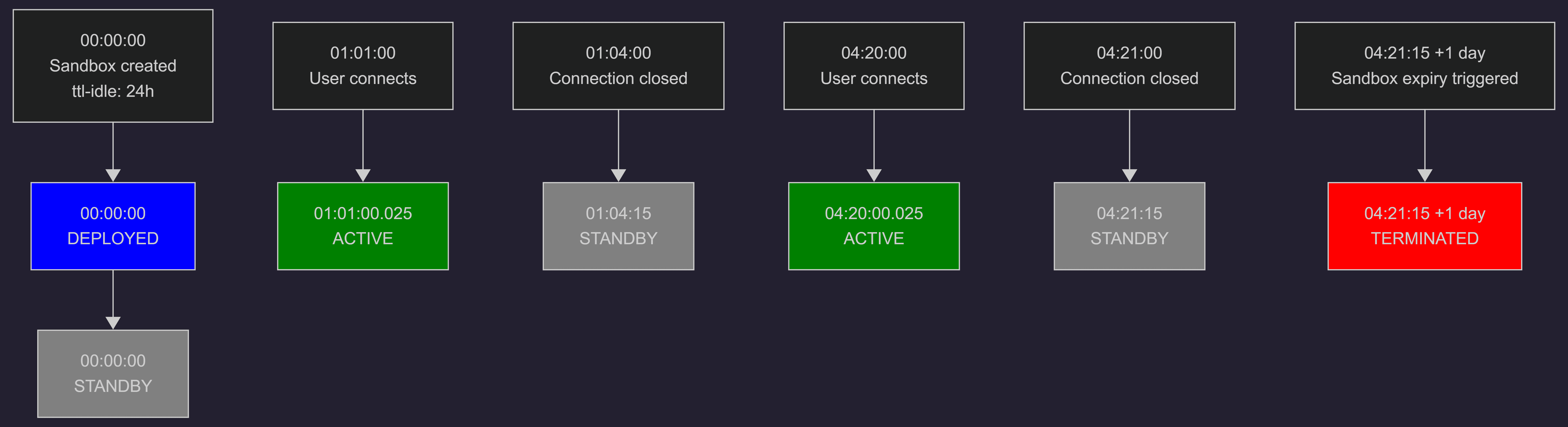
Example
An example might help make this clearer:
| Time | Event | State change |
|---|---|---|
| 01:00:00.000 | Sandbox created with ttl-idle: 24h | Deployed -> Standby |
| 01:01:00.000 | Sandbox received connection request | Standby -> Active |
| 01:04:00.000 | Sandbox detected no active connection | Active -> Standby |
| 04:20:00.000 | Sandbox received connection request | Standby -> Active |
| 04:21:00.000 | Sandbox detected no active connection | Active -> Standby |
| 04:21:15.000 (+1 day) | Sandbox expiration policy triggered | Standby -> Terminated |
Now that you know how it works, all that’s left is to try it! Launch a secure, persistent sandbox today on app.blaxel.ai and see our automatic lifecycle management in action. If you have questions or feedback, let us know in Discord.
Related articles

Engineering
Choose the right storage for your Blaxel agents
Blaxel agents have three storage options: the sandbox filesystem, volumes, and Agent Drive. Understand what each option does and when to use it.
12 min read

Engineering
What if Lambda and EC2 had a baby?
Building for agentics requires more than just containers. We moved to bare metal to give agents instant-launching persistent sandboxes. An anatomy of our runtime.
12 min read

Engineering
We slashed our network latency to under 50 milliseconds
Our next-gen infra reduces request latency to sub-50 ms, enabling near-instant agentic responses across the network.
10 min read