10 min read
We slashed our network latency to under 50 milliseconds
Our next-gen infra reduces request latency to sub-50 ms, enabling near-instant agentic responses across the network.

Over the last few months, we've completed the rollout of Mark 3.0, our third-gen compute infrastructure, and we’re preparing to launch Mark 3.1 infrastructure, with extended network capabilities and a new compute engine. One of the key components of our Mark 3.x infrastructure is a new network routing layer, redesigned from the ground up to be faster and more scalable than its predecessor. And the news from the front lines is good: since rollout, we've been seeing sub-50 ms response times across our network - that's a consistent 9x reduction in request latency from what we had before!
Why is this important? By reducing routing overhead to a negligible level, our redesigned system enables multi-step agentic tasks running on our network to execute at near-instant speeds. The result: faster agent responses and a better end-user experience.
In this blog post, we'll explain why we made this change, how we implemented it, and (fun!) some of the metrics we used to keep us on track.
Challenge #1: Agentic systems need sub-50 ms routing
Modern AI agents often rely on a chain of multiple sequential tool calls to complete a task. A user's request might trigger an agent to call one tool, process the result, and then call another. These tool calls can spin up ephemeral sandboxes where AI-generated code is executed and custom tasks are processed. Complex agentic systems can often chain dozens, or even hundreds, of such calls.
Low-latency performance is therefore a critical requirement for agentic systems running across multiple regions, like those typically deployed on Blaxel. However, in our measurements, we saw that our end-to-end routing overhead regularly exceeded 250 ms.
When an agentic step incurs a 250 ms latency penalty, even a basic three-step chain would accumulate over 750 ms of network delay before the compute even begins. This is well above the traditional 300 ms hard limit for a user experience to feel sluggish.
Challenge #2: Enterprises need precise control over deployments
For enterprises, AI governance is paramount. This governance takes many shapes: controlling execution locations, managing AI compute costs, setting data retention durations, and more.
As a production-grade platform, Blaxel already supports these requirements via policies. Policies can be attached to any resource upon deployment, and enforce rules like allowed execution locations or maximum allowed number of LLM tokens. Custom policies are available for enterprise customers needing specific region subsets or custom domains.
For the networking layer, one policy is particularly interesting: the location policy. This policy lets Blaxel users enforce rules about which geographical regions their workloads can execute in. It comes in two variants: country policies ("execute workloads only in Australia, Japan and Singapore") and continent policies ("execute workloads only in Europe").
This single feature is extremely important for enterprise customers who need precise deployment control. It's also one of the most challenging aspects of our architecture, because every user request must be authenticated, authorized, and routed to the nearest compliant and available compute node. And of course, this has to happen fast (remember challenge #1)!
Centralized lookups were a bottleneck
Our original routing architecture relied on a distributed key-value store (Cloudflare KV) paired with a global lookup service (built with Cloudflare Workers). This approach required every request to first pass through the lookup service, which would perform a real-time query to resolve the workload identifier. The query would determine the appropriate destination region for each incoming request, taking into account the resource's deployment policies. The request would then be forwarded to the appropriate compute infrastructure for further processing.
Here's a diagram showing the decision path for resolving a request:
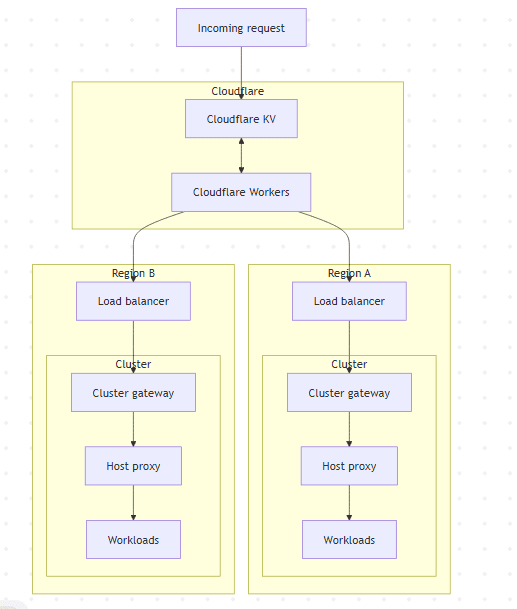
You probably already see the bottleneck. Every connection had to wait for a data fetch before routing decisions could be made. This wait time was not trivial: in our measurements, we found that cold lookups added approximately 100 ms, while warm lookups averaged 10 ms. A session typically requires multiple new lookups for different resources. Consequently, the end-to-end routing overhead regularly exceeded 250 ms.
The problem was clear: users were often spending more time on routing decisions than on the compute tasks themselves.
Migrating to a modern, distributed architecture
At first, we tried to optimize the lookups. For some operations, we needed to work with lists of keys rather than a single key to respect our data model and our write-concurrency patterns, since Cloudflare KV is eventually consistent. However, while Cloudflare KV is very fast at reading a single key, listing a subset of keys is slow.
While investigating this, we discovered that Cloudflare Durable Objects were ~10x faster for listing operations when keys weren't cached, but they also had a longer warmup time. So we tried to get the best of both worlds by implementing a unified storage layer: Cloudflare KV as a fast cache for reads and warm listings and Cloudflare Durable Objects for cold keys.
This allowed us to use the fastest possible path whenever possible. However, despite this optimization, the performance improvements were not significant enough to meet the performance targets we had in mind.
So, we reframed the question: Why are we trying to solve a global optimization problem using centralized architecture?
Instead of a central router, we envisioned a distributed system:
- The network decides where traffic enters.
- The region authenticates and dispatches the workload.
The core design philosophy was to move from a centralized database to a distributed routing mechanism.
How it works
We implemented a new approach to multi-region resource deployment. Under this revised approach:
- Sandboxes always deploy to a single region, while agents and MCPs can deploy across multiple regions simultaneously.
- At creation time, users can optionally set a deployment region.
- If the region is set, the resource is deployed in the specified region, assuming this is allowed by policies defined separately.
- If no region is set, the resource is deployed in all available regions (for agents and MCPs) or to a single region (for sandboxes), again subject to pre-defined policies.
- At access time, the resource can always be accessed using its regional endpoint. Agents and MCPs deployed in multiple regions can also be accessed using a global endpoint, in which case they are routed to the closest available region.
A key part of this transition was making our URLs self-describing, embedding all necessary routing data directly into the hostname.
- Previously, a URL followed the format
https://run.blaxel.ai/workspace-12345/agents/my-agent. - Under the new approach, the same URL becomes
https://agt-myagent-12345.us-pdx-1.bl.run.
Here is the breakdown of this URL format:
| URL component | Purpose | Example |
|---|---|---|
| Product Type | Identifies the Blaxel product (Sandbox, Agent, MCP) | agt, sbx, mcp |
| Workload ID | The unique identifier for the specific workload | myagent |
| Workspace ID | The unique identifier for the specific workspace | 12345 |
| Region | Specifies the target region, region group, policies or a global entrypoint | us-pdx-1, eu, none |
| Blaxel's execution domain | The base domain for requesting workloads on Blaxel | bl.run |
This structure turns the URL into a routing instruction, eliminating the need for database lookups. For example:
- If an agent is deployed in Europe, it can be accessed at both a continental endpoint like
https://agt-myagent-12345.eu.bl.runand a country- or region-specific endpoint likehttps://agt-myagent-12345.eu-lon-1.bl.run. In the first case, the network will select the optimal region to divert the request. - If an agent is deployed globally, it can be accessed at a global endpoint like
https://agt-myagent-12345.bl.run, which then finds and diverts the request to the closest region worldwide.
This approach enables customers to have flexibility (let the network select the optimal region) without losing the option to route to specific endpoints if needed.
Another benefit of this approach is that we no longer modify the final deployment URL. For example, under the previous approach, the local endpoint /my/awesome/api/endpoint might have been modified to /agents/workspace/my/awesome/api/endpoint once deployed. This was non-standard and could (and did!) break customer applications - for example, redirects.
Behind the scenes, when our Amazon CloudFront entrypoint receives a request for, say, https://agt-myagent-12345.eu.bl.run, here's what happens:
- CloudFront uses a set of anycast IPs to route the user to the closest point of presence. It terminates TLS and applies WAF rules.
- A CloudFront JavaScript Function parses headers to select the appropriate origin group (
eu). - The selected origin group points to a Route 53-managed DNS latency-based record set containing a list of EU cluster groups (
eu-lon-1,eu-par-1, ...). - The DNS service automatically picks the nearest healthy region in real time based on latency and availability.
- If no region is specified (say,
https://agt-myagent-12345.bl.run), CloudFront routes to the global origin group, and the DNS service chooses the closest region worldwide.
Here's a diagram showing the new decision path for resolving a request:
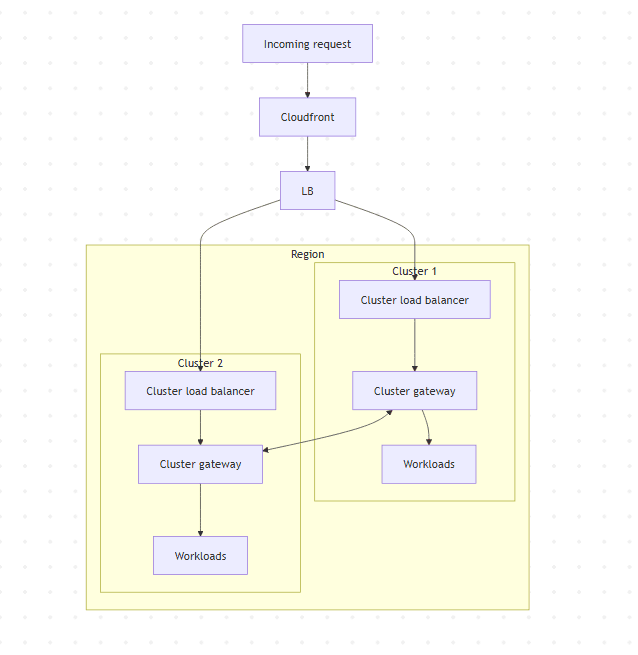 Once traffic reaches a region, it passes through a cluster gateway, a lightweight proxy written in Rust. Each gateway handles authentication and authorization, validating JWTs and tenant policies locally, before routing requests to agents, MCPs, and sandboxes. It also handles connection lifecycle, failover, rerouting traffic when a neighbor spikes or fails, and integrates with the host proxy
Building a custom proxy with Pingora
We wrote our own proxy using Pingora, Cloudflare's framework for high-performance L4/L7 services, instead of using an off-the-shelf HTTP proxy or traditional NGINX. The main reason to “roll our own” proxy was that all the existing HTTP proxies were primarily designed for very short requests and not for longer agentic feedback loops (an agent calling an LLM can wait several seconds or minutes before getting an answer).
Building our own proxy also let us support:
- Different authentication and authorization strategies, including public/private key authentication, API key authentication, and JWT;
- Product-specific business logic, with different handling for models, agents, MCP servers and sync/async requests.
Pingora gave us a modern, flexible foundation to implement our requirements, plus complete control over the core business logic of the routing system.
Phased rollout and migration
Once we had this system operational, we had to think about rollout - a complex task which needed flawless execution to avoid disrupting production environments for our customers.
First, we deployed the system to our development environment and ran stability tests for 2-3 weeks to check for memory leaks and production readiness. We also stress-tested the system with 20,000-50,000 parallel connections to confirm that the core routing approach scaled well under load, and started migrating identity and access management data from Cloudflare KV to the new system.
One of our biggest challenges in this phase involved migrating workload IDs from the older hash-based format to the new product-based format (sbx-12345). The older format was used or computed in multiple components (database, cluster gateway, SDKs) of our platform.
Here are some of the things we did to incrementally migrate workloads without breaking them:
- We started creating dual-named services and other resources in our clusters months before the rollout, for backwards compatibility.
- We upgraded our SDKs and other components to read endpoint URLs from our API instead of computing them internally.
- We continued to operate the lookup service at
run.blaxel.aiwith Cloudflare Workers during the migration period to ensure compatibility with existing clients and workloads.
The results: 90% of requests served in 50 ms or less
Let's start with some stats:
- We currently serve more than 7.5 million requests per day.
- Typically, we serve 63,000 requests over 30 minutes.
- At peak, we have been able to serve 100,000 requests over the same duration.
To monitor and quantify the impact of the new routing layer, we instrumented the entire request path using OpenTelemetry within our observability stack. Here are two key indicators that we use to benchmark the performance delta between the legacy centralized architecture and the new distributed system:
- Round-trip time (RTT): The total time from when a request arrives at CloudFront until it returns to the client.
- Time-to-fetch: The time between when a request is received at the cluster gateway and when it is sent to the backend (the actual gateway processing time)
Round-trip time
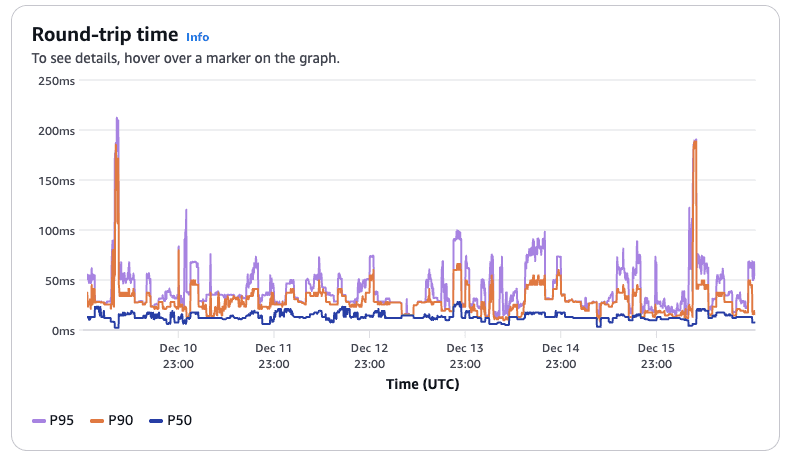
This graph shows that median latency (P50) is both low and stable under 30 ms, and that 90% of requests (P90) take less than 50 ms. There are some requests (the spikes) which take longer than 100 ms. These values also include the actual processing time of the end-user application, so the spikes are probably indicative of increased workloads. These numbers are more or less the same across the entire period, indicating that the network is relatively stable.
Time-to-fetch
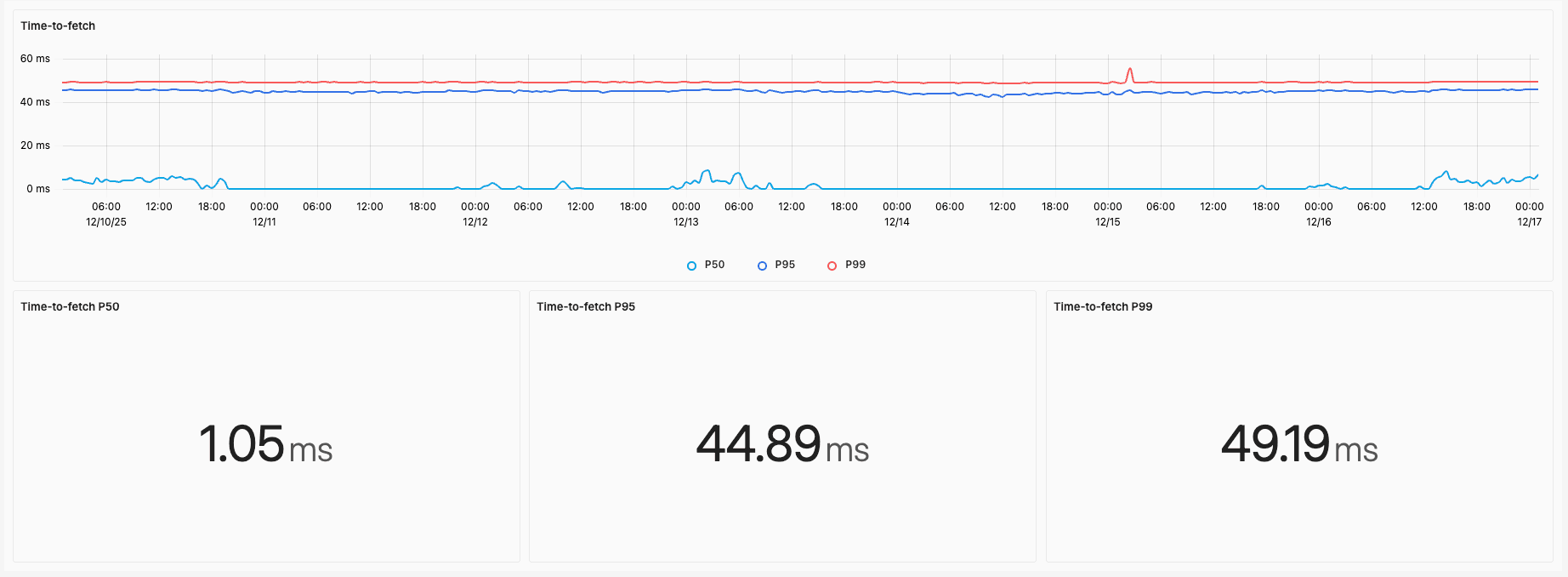
This second graph shows a similar picture. Median latency is 1 ms and 99% of requests complete in less than 50 ms. The remaining latency is now primarily due to the physical distance between the request origin and our servers.
It’s worth mentioning that these aren’t our only metrics. We track dozens of metrics at the gateway level and we also monitor internet routing performance to get a sense of the end-to-end performance for the user.
Other benefits: Fewer dependencies, support for parallel deployments
In addition to the network performance improvements described above, our redesigned architecture solves various other problems that were also on our to-do list:
- Our previous architecture was heavily dependent on Cloudflare Workers and Cloudflare KV. This created a single point of failure for us in case of upstream network outages. By self-hosting the cluster gateways and embedding routing information in URLs, we removed the dependency and also took control of deployment and incident response.
- Our previous implementation was written in TypeScript and WebAssembly. There were some challenges with this implementation: it was hard to find mature runtimes outside the major providers, some key dependencies didn’t work, and performance was lower than expected. By switching to Rust and Pingora, we were able to solve all these issues very quickly.
- Cloudflare KV follows an "eventually consistent" model, which created concurrency issues for us when customers performed parallel deployments across the 16 different regions (Mark 2 infrastructure). Our new approach eliminates the need to store region information separately, streamlining parallel deployments for our customers.
Conclusion
With the redesigned architecture in place, we have seen that our new routing layer is delivering sub‑50 ms latency for the vast majority of our traffic, with only occasional spikes.
We're deeply invested in continuing to improve performance across every layer of our stack, and we'd love to have you try it out and see what you think!
Here are a few links to get you started:
- Quickstart
- Create a Blaxel sandbox
- Monitor your resources and workloads
- Enforce deployment policies
- See a list of available regions
If you'd like to know more about this implementation or have suggestions and feedback, join our Discord and let us know!
Related articles
Engineering
Choose the right storage for your Blaxel agents
Blaxel agents have three storage options: the sandbox filesystem, volumes, and Agent Drive. Understand what each option does and when to use it.
12 min read
Engineering
Understand the lifecycle of a Blaxel sandbox
Learn how sandboxes are built, managed, billed, and cleaned up behind the scenes.
12 min read

Engineering
What if Lambda and EC2 had a baby?
Building for agentics requires more than just containers. We moved to bare metal to give agents instant-launching persistent sandboxes. An anatomy of our runtime.
12 min read