4 min
Blaxel brings persistent workspaces to OpenAI's Agents API
Turn one agent's findings into the next agent's starting point. Blaxel gives OpenAI agents isolated computers and persistent files for work that spans tasks and teams.

An agent finishes an investigation and saves its findings. Its computer is deleted. Later, another agent opens those files and turns them into an action plan.
Blaxel brings that continuity to OpenAI's Agents API with isolated sandboxes and persistent workspaces. OpenAI runs the agent and maintains its session. Blaxel supplies its computer, and Agent Drive keeps the files you want to carry forward. Useful work can become the starting point for the next task, without keeping the original computer running.
From investigation to action
Consider a billing incident. Engineering needs to understand what went wrong. Customer outreach needs to prepare a response. Someone then has to bring both perspectives together into a plan.
Our companion example gives that work to three agents. Two specialists start in parallel, reading the same incident brief. Each has its own OpenAI session and Blaxel Sandbox:
- Engineering investigates the incident and saves its findings to
engineering.md. - Customer outreach prepares a response in
support.md.
Both save their output to a shared Agent Drive. When they finish, their sessions and computers are deleted. Their findings remain.
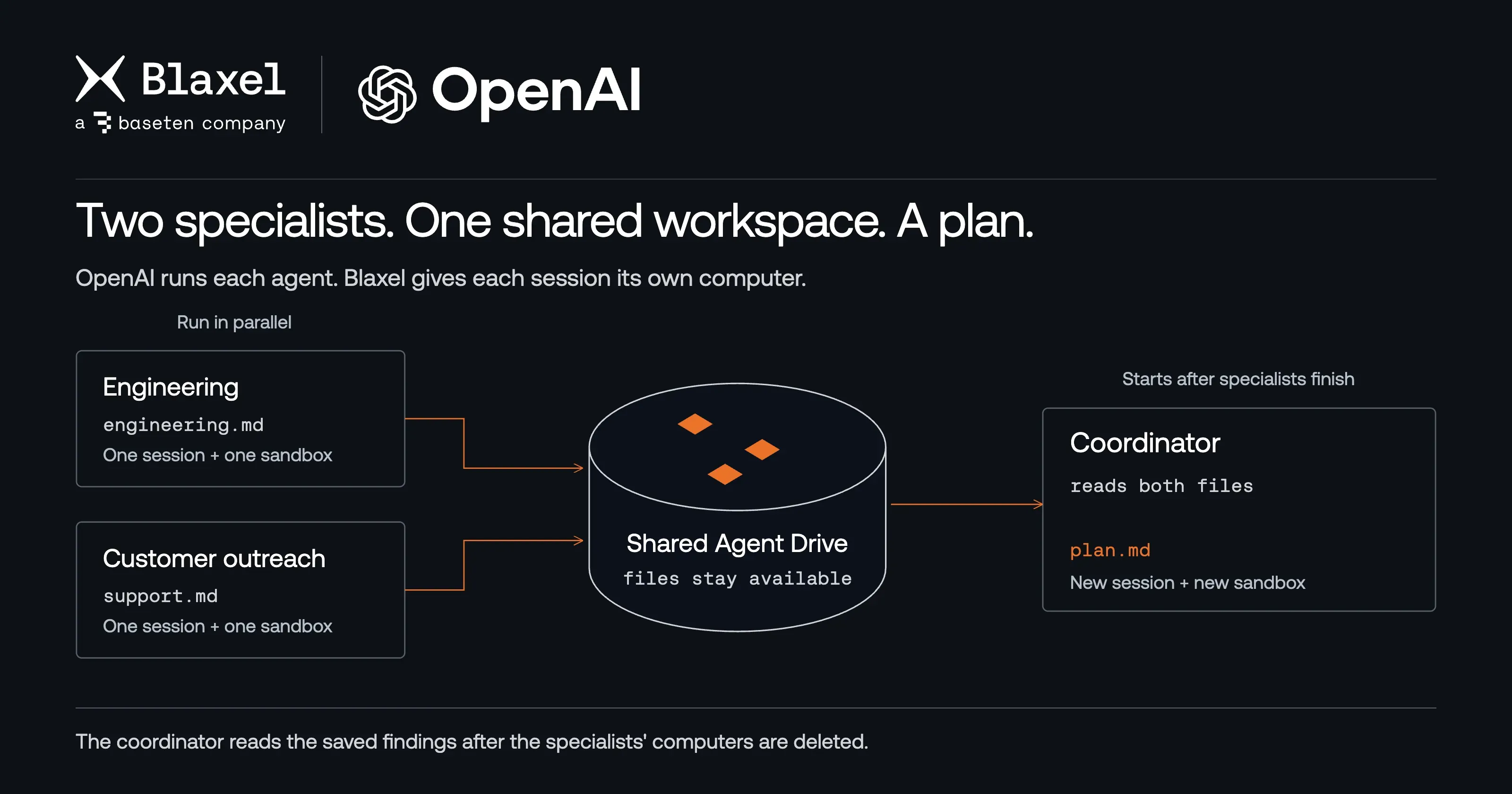
The specialists save their findings; the coordinator uses them after the specialists finish. Each agent session uses its own sandbox.
The coordinator then reads both files from the same Drive, using its own session and sandbox. It writes plan.md with owners, deadlines, and references to the specialists' findings.
Your application passes the coordinator the filenames. The full findings stay in the workspace, where you can inspect them, use them in a follow-up task, or give another authorized agent access. You can divide a project into focused tasks and keep the work available between them.
This example scopes Drive access to one trusted team, with one writer per output file. Each agent keeps its own conversation history; the shared workspace carries their written work between sessions.
Keep the files, replace the computer
Persistence also helps when one agent's work spans several tasks. It can save an investigation today and use those findings in a follow-up, even if its original sandbox has been removed.
We tested that lifecycle in one OpenAI session. The agent saved a note to Agent Drive, then we stopped its executor and deleted the sandbox. After OpenAI reported the disconnect, the next input triggered a webhook that started a replacement worker with the same Drive. The agent read the original note and completed the next task. We verified the exact saved content.
Agent Drive retains files written to its mounted directory. Files elsewhere in the sandbox disappear when that sandbox is deleted, and running commands end with it. A replacement computer picks up from saved work; it does not restore a killed process.
That lets you keep a workspace available for follow-up work while releasing its compute between tasks. In this integration, the connected executor keeps its worker awake. Deleting a finished worker releases that compute; the next task can trigger a replacement.
How your application connects
Deploy the cookbook's webhook handler in your Blaxel account and register it with OpenAI. Your application creates sessions, submits tasks, and receives results through the Agents API. The handler takes care of provisioning or reconnecting each session's sandbox when OpenAI requests an environment connection.
Inside the sandbox, an executor connects outbound to OpenAI to run the agent's commands. That connection needs no inbound worker port. The handler verifies webhook signatures before starting workers, and each independent webhook session gets its own Drive and scoped access permissions.
Configure a separate restricted executor key for workers. It allows the environment connection while keeping your application key with your application and controller. The guide covers credentials and deployment; the cookbook includes the replacement-worker check and the shared-workspace example.
Build on the first result
Start with a task that produces something worth keeping: an investigation, a patch, or a plan. Then give the next task access to those files.
You'll need Agents API access and Agent Drive enabled in your Blaxel workspace to run the persistence examples.
- Deploy the integration. Connect the webhook handler and configure credentials.
- Try the agent team. Run the specialists and coordinator, then inspect the files they leave behind.
Related articles
[BLAXEL NEWS]
Close your laptop. Keep DeepSeek Harness working on Blaxel.
Take your DeepSeek Harness task to a private Blaxel host and let it keep working. Review the patch, then return the files and conversation to your computer.
September 09, 2026 • 4 minutes reading.
[BLAXEL NEWS]
Give each Herdr coding agent its own Blaxel sandbox
Run coding tasks in their own Blaxel sandboxes from Herdr. Inspect the app, compare results, and choose which patches reach your local repository.
September 08, 2026 • 4 minutes reading.

[BLAXEL NEWS]
Choosing a sandbox is choosing your agent infrastructure
StarSling benchmarked our compute layer. Production agents also need their work to persist and the right networking and controls around that compute.
July 23, 2026 • 2 mins.